
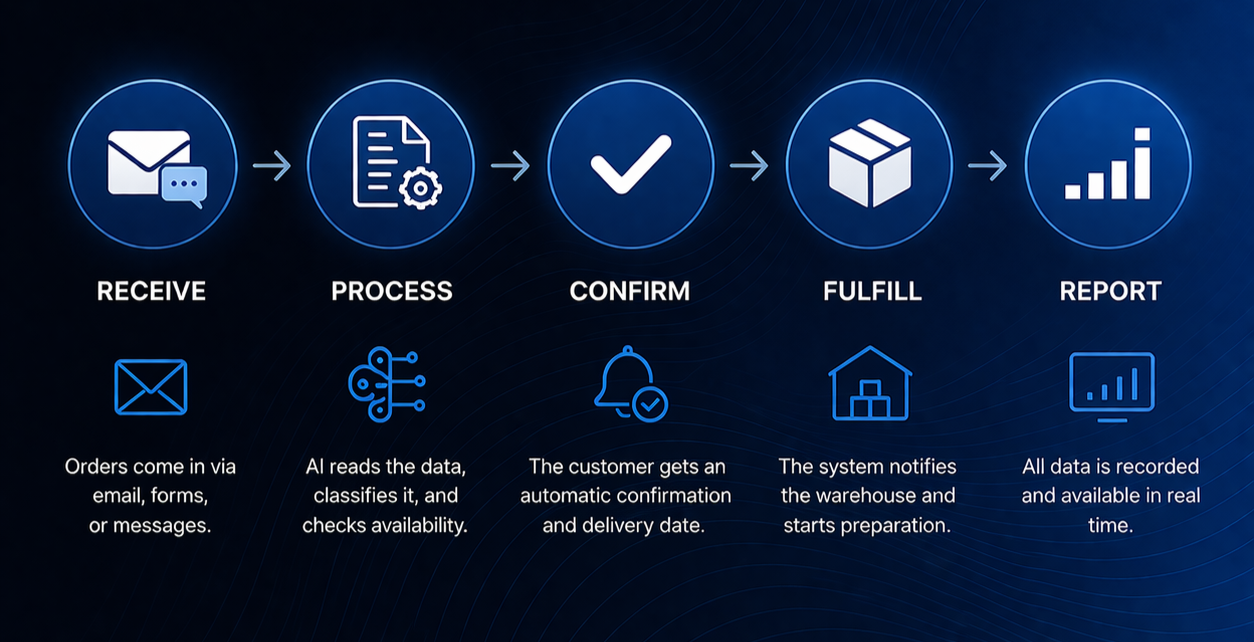
What order automation looks like in practice
Processing orders manually can feel “good enough” — until volume starts to grow.
At some point, problems begin to show up:
- orders arrive from multiple channels
- data gets duplicated
- mistakes become a daily issue
- too much time is spent on repetitive tasks
Here is what a typical process looks like — and how automation changes it.
The problem
The client received orders through:
- Viber
- phone calls
Employees were:
- manually entering data into Excel
- checking availability
- replying to customers
- forwarding information to the next team
The result:
- processing time: 2–3 hours per day
- frequent mistakes and duplicated data
The solution
We built a system that connects all order sources and automatically moves the process from start to finish.
Without manual data entry.
How the process works now
Intake
Orders arrive from email, forms, or messages.
Processing
The system automatically reads the data and checks availability.
Confirmation
The customer receives an automatic order confirmation.
Fulfillment
The system notifies the warehouse and starts preparation.
Reporting
All data is recorded and available in real time.
The result
- 2–3 hours → 15 minutes per day
- significantly fewer mistakes
- full control over the process
Employees no longer enter data manually — they monitor the process and handle exceptions.
The key point
Automation does not start with technology.
It starts with understanding the process.
Once it is clear where time and money are being lost, the solution becomes much simpler.